
How to create accessible PDFs: every option, honestly compared
Word, InDesign, Acrobat Pro, specialist tools, service providers or the free sitebrunch PDF editor: how to create accessible PDFs, and how to find the option that fits you.
A WCAG test is a structured assessment of your website or web application against the Web Content Accessibility Guidelines (WCAG 2.2), the international standard for accessible web design. It shows you which barriers your content has, where you fall short of the legal requirements and what needs to happen next.
A WCAG test is a structured assessment of your website or web application against the Web Content Accessibility Guidelines (WCAG 2.2), the international standard for accessible web design. It shows you which barriers your content has, where you fall short of the legal requirements and what needs to happen next.
A WCAG test checks whether your digital content meets the success criteria of WCAG 2.2. The criteria are written as testable instructions, so you can verify them directly on the live site (contrast, keyboard operation, focus, code structure, alternative texts and so on).
Automated tests are not enough on their own. They only cover part of the legal requirements, and for the majority you need manual checks. A complete audit takes you through 96 test steps based on EN 301 549 and WCAG 2.2.
The benchmark is conformance level AA. That is the level referenced by the BFSG, the BITV and EN 301 549. So a WCAG test answers two questions at once: how accessible is this, and are we compliant?
The WCAG are built on four principles: perceivable, operable, understandable and robust. The assessment follows the same structure. Each principle comes with concrete success criteria that can be verified on the real product.
A few examples from the WCAG reference by Gehirngerecht Digital, to show how tangible this gets:
Contrast of text (1.4.3): at least 4.5:1 for text below 24 pixels, 3:1 for larger text.
Keyboard (2.1.1): the site has to be fully operable by keyboard, including every important function.
Focus visible (2.4.7): it must always be clear which element currently holds keyboard focus.
Reflow (1.4.10): at 320 pixels width (or 400 percent zoom) all content and functionality has to remain available, without horizontal scrolling.
Target size (2.5.8): interactive elements need a clickable area of at least 24 by 24 pixels.
Some of this can be detected automatically, but the larger share cannot. Whether an alternative text actually conveys what the image shows, or whether the focus order makes sense, is something only a person can judge.
The WCAG define three levels:
Level A is the foundation. Fail it and you lock entire user groups out completely.
Level AA is the benchmark referenced by legislation. The BFSG, the BITV and EN 301 549 all require this level. In practice, when you test, you test against AA.
Level AAA goes further and is not intended as a general requirement for entire websites. Individual AAA criteria are still worth implementing when your audience needs them.
In short: AA is the target, anything below is legally insufficient, anything above is voluntary.
In practice, a WCAG test runs in two stages.
Stage 1: automated scan. An automated check finds the technically unambiguous errors within minutes, such as missing alternative texts, missing language declarations or contrast violations. A good starting point, but only a slice of the picture.
Stage 2: manual assessment. This is where the site actually gets used, with a keyboard, with zoom, with assistive technology. There are two sensible scopes for this:
Kick-off audit: a quick check covering the most critical WCAG criteria. Within a single person-day you get a reliable overview of the critical barriers. Designed for the start of a project, when a non-accessible website already exists.
Complete audit: the systematic assessment of every relevant requirement of EN 301 549 and WCAG 2.2, broken down into 96 test steps.
With sitebrunch Accessibility you do both yourself. Every test step has been prepared together with Gehirngerecht Digital in plain language, with videos, images and examples, plus built-in tools like the contrast checker. Using the browser extension you run each test step directly on the real page, and in comment mode screenshots are captured automatically. For every test step you get the typical issues along with matching solutions, complemented by up to three AI-assisted suggestions you can edit and build on.
The result is an audit report you can share via link and filter. Barriers you find move straight into your existing workflow as tickets through the integrations with awork, Jira, Notion, Asana and Azure Boards. And if you want the fix in the code right away: the sitebrunch MCP server lets AI assistants like Claude Code and OpenAI Codex resolve issues from your audits directly in the code.
What is required is not the test but the outcome: your digital offerings have to be accessible. The BFSG, the BITV and the BaFG all use WCAG conformance level AA as the benchmark, by way of EN 301 549. Without an assessment you simply do not know where you stand. And if a complaint or a market surveillance check comes in, you need documentation that holds up, which is exactly what a structured audit produces.
You do not need an external testing body to get started. A free test at sitebrunch.com gives you a WCAG report with concrete recommendations in about two minutes. For the manual assessment you then begin with a kick-off audit and move on to the complete audit when you need to.
There is a side benefit: the test steps are written so you can follow them without a technical background. Test regularly and you build real expertise instead of just ticking off a checklist.
Start testing for free at sitebrunch.com
Yes. The automated check requires no prior knowledge, and for the manual assessment the audit walks you through every requirement step by step, each with an explanation, a video and examples. If you want to go deeper, the training content from Gehirngerecht Digital covers digital accessibility in design, development and editorial work at your own pace.
The WCAG are the international standard for accessible web content. EN 301 549 is the European standard referenced by the BFSG and the BITV. It adopts the WCAG criteria and adds requirements that go beyond web content alone. For websites this means that testing against EN 301 549 covers the WCAG as well.
"WCAG test" describes the benchmark, "audit" describes how thorough the process is. An automated WCAG check is a quick snapshot. An audit is the complete, documented assessment with evidence, screenshots and a list of actions, either as a kick-off covering the most critical criteria or in full across all 96 test steps.
Accessibility is not a one-off check but a permanent requirement for everyone offering digital products and services. Every relaunch, every new feature and every published article can introduce new barriers. The sensible setup combines automated monitoring, which evaluates new URLs continuously, with a manual audit at fixed intervals that you start from the previous audit so you can tick off what has been fixed.
Yes. PDFs are part of your digital offering and have to be accessible as well. You can upload individual files and check them against WCAG and PDF/UA, or have your website scanned automatically for PDFs and test them as a batch.
Start today with sitebrunch and make sure your digital content is accessible.
Start for free (öffnet neuen Tab)Word, InDesign, Acrobat Pro, specialist tools, service providers or the free sitebrunch PDF editor: how to create accessible PDFs, and how to find the option that fits you.
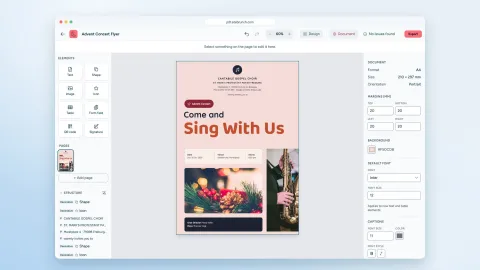
With the sitebrunch PDF editor you design accessible PDFs, convert Word files and create forms. Free, no sign-up and entirely in your browser.
Free tools, guided self-tests or expert audits: what it costs to test your website for accessibility, what drives the price and when a self-test is enough.