
Pick up an existing audit again with a re-audit to check solved problems, find new barriers and track the accessibility progress of your website step by step.
Last updated: June 3, 2026
Requirements
Before you can start a re-audit, you should have done the following:
You have an account and can log in.
You have at least the Solo plan.
You have created a project for your website.
You have finished an audit that you want to run a re-audit for.
What a re-audit is good for
With a re-audit you can check
whether reported problems have since been fixed and
whether changes to your website have caused new problems.
This makes a re-audit ideal for tracking the accessibility progress of your website over time.
Start a re-audit from the audit report
This is how you start a re-audit directly from the audit report:
Open your project and go to the audit overview.
Select the finished audit you want to check again.
Click “View report” to open the audit report.
In the audit report, click the “Start re-audit” button.
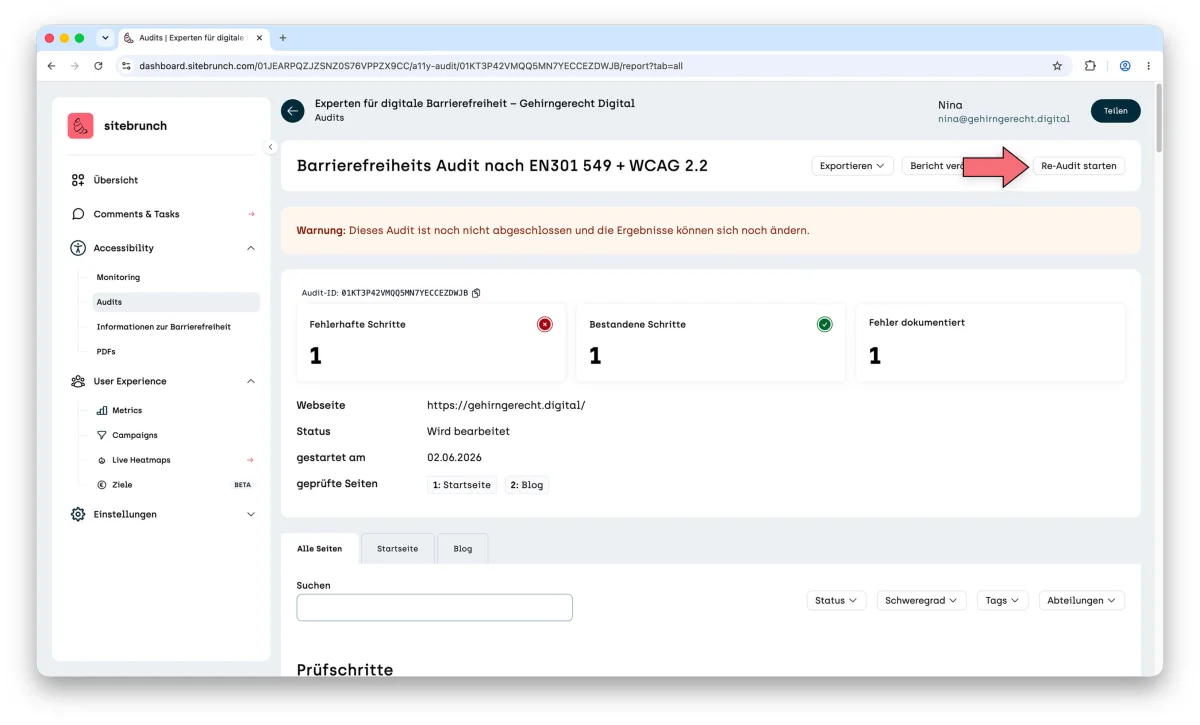
sitebrunch now creates a copy of your previous audit in edit mode.
What the re-audit carries over
The new audit:
contains all previous findings (comments) from the original audit,
lets you check for each finding whether the problem has been solved or still exists,
helps you document new problems caused by changes.
You work with testing steps, comments, severities and roles as usual.
Track your accessibility progress
With every re-audit you build on the existing results. This way you can systematically track
which problems have already been fixed,
which are still open and
whether new barriers have appeared over time.
This gives you a clear overview of how the accessibility of your website improves step by step.